

Analyse spreadsheets with AI in XgenOffice
Sheets in XgenOffice for Windows edits Excel (.xlsx) files. Ask the ZenithAI panel to analyse data or change the workbook, or use AI Check and AI Analyze. The AI applies its changes straight away and shows Applied N changes with Undo. Changes are not saved to the file until you press Ctrl+S.
How to analyse spreadsheets with AI in XgenOffice
- Open or create a spreadsheet from the Home screen.
- Click ZenithAI, then type a request such as "total orders by city in a new sheet".
- To work with data from another file, attach it with the paperclip.
- Check the result. Click Undo on the Applied N changes chip, or press Ctrl+Z, to undo it.
- Press Ctrl+S to save the changes to the file.
When to use it
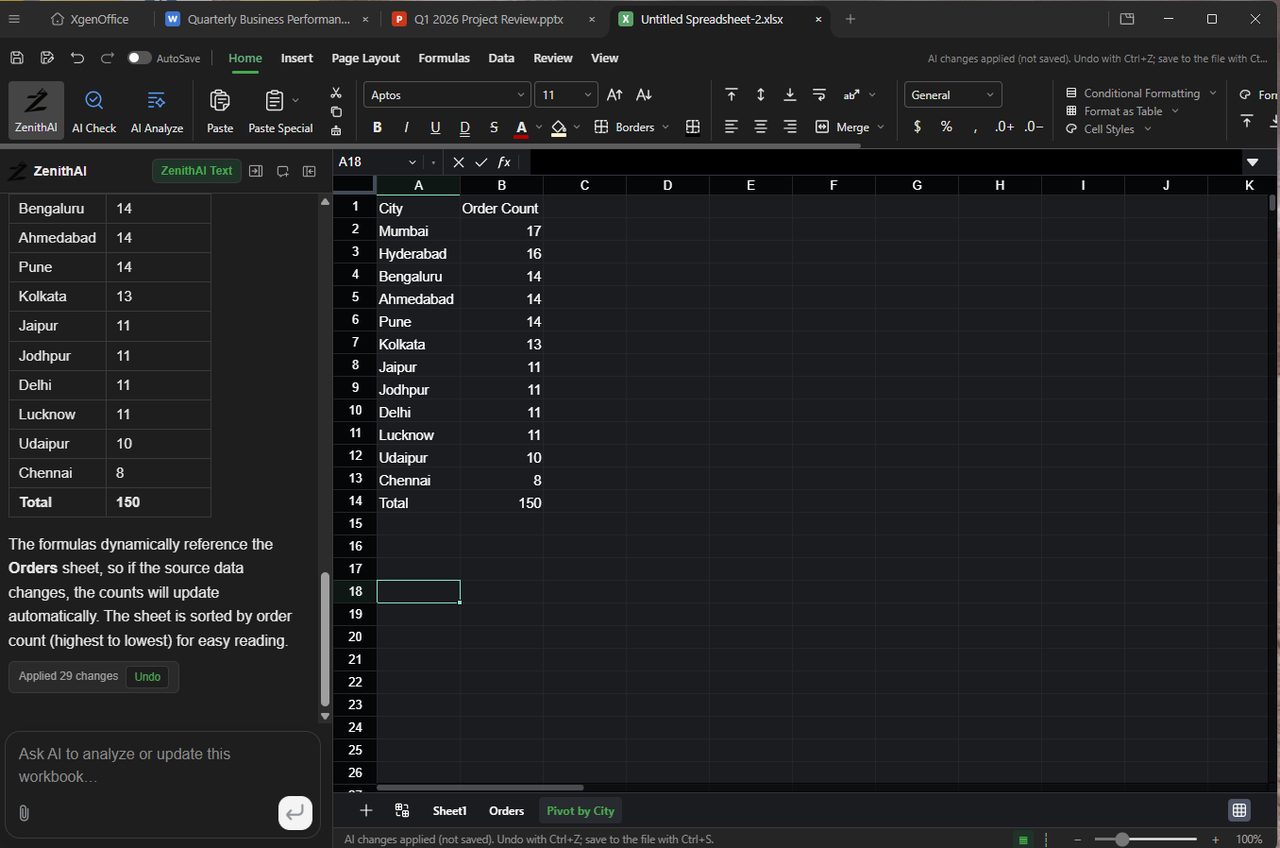
Rohit has 150 orders in a sheet. He asks the AI for order counts by city in another sheet. The AI adds a Pivot by City sheet sorted from highest to lowest, and he saves the file.
Good to know
- XgenOffice for Windows is in Beta: free for paid XgenPlus plans, provided without support or warranty until its final release.
- The ribbon has Home, Insert, Page Layout, Formulas, Data, Review and View. Buttons that are greyed out are not available yet in the Beta.
- Large workbooks load in parts. The status bar shows "Streaming" while rows load, and some actions such as sort and filter wait until the whole workbook is loaded.
- You can export a workbook as PDF.
Common questions
Does the AI save my workbook?
No. The status bar says "AI changes applied (not saved)". Press Ctrl+S to save them to the file.
Does it make a real PivotTable?
When you ask for a pivot, the AI may build a summary table with formulas that refer to your data, which update when the data changes. Check the new sheet to see what it made.
Can I open a .csv file in XgenOffice Sheets?
Yes. A .csv file opens as a copy, and Save saves that copy as an .xlsx file.
Can XgenOffice for Windows open an old .xls file?
Yes, with no conversion needed first. Sheets opens the .xls file as a copy, and Save saves that copy as a new .xlsx file. The original .xls file is not changed.