

Open Settings and find an option
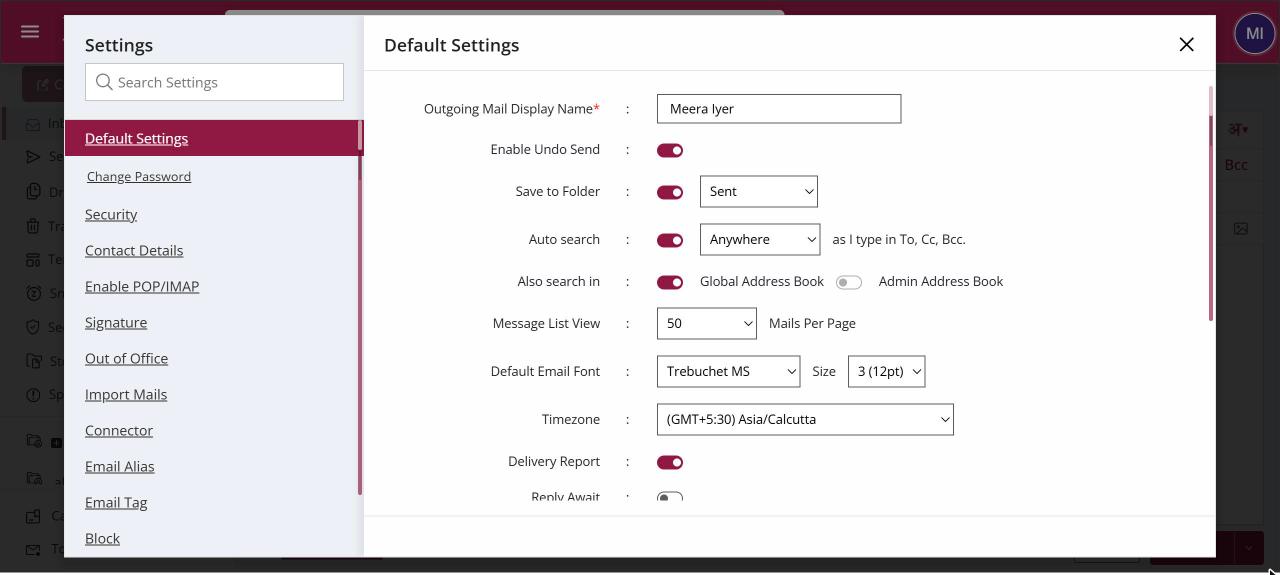
To open your settings, click your profile picture at the top right and choose Settings. Pick a section from the list on the left, such as Default Settings, Signature or Out of Office, or type a word like "signature" in Search Settings to jump straight to it. Most options save as soon as you change them.
For: EveryoneWeb
How to open settings and find an option
- Click your profile picture at the top right.
- Choose Settings.
- Click a section in the left list, or type in Search Settings.
- Change the option. Where you see an Update button, click it to save.
When to use it
On his first day at acme.in, Arjun types "signature" in Search Settings, lands on the Signature section and sets up his signature in a minute.
Options
| Section | What you set there |
|---|---|
| Default Settings | Display name, Undo Send, sent-mail folder, address suggestions, mails per page, font, time zone, tracking defaults, delete behaviour and notification tone. |
| Change Password | Your mailbox password. |
| Security | Account security options, including Antispam. |
| Contact Details | Your own profile and contact card. |
| Enable POP/IMAP | Access from desktop and phone mail apps. |
| Signature | Your email signatures. |
| Out of Office | Automatic replies while you are away. |
| Import Mails | Copy mail in from another account. |
| Connector | Work with another mail account inside XgenPlus. |
| Email Alias | Extra addresses for your mailbox. |
| Email Tag | Your own tags for labelling mail. |
| Block | Your list of blocked senders and domains. |
| Rules/Advance Forwarding | Rules for incoming mail and automatic forwarding. |
| Antispam Dashboard | Your antispam console, if your organisation uses it. |
Good to know
- A short message confirms when a setting has been updated.
- The first time you change a setting each day, XgenPlus may ask you to confirm a verification code.
Common questions
Why is a section missing from my Settings?
Your administrator can hide sections, such as Signature, Out of Office or Import Mails, for your mailbox. Some sections also appear only when a service is turned on, such as Antispam Dashboard.
For admins
Administrators control this feature for the whole domain:
Was this page helpful?
Updated 2026-10-28