

What's in Default Settings
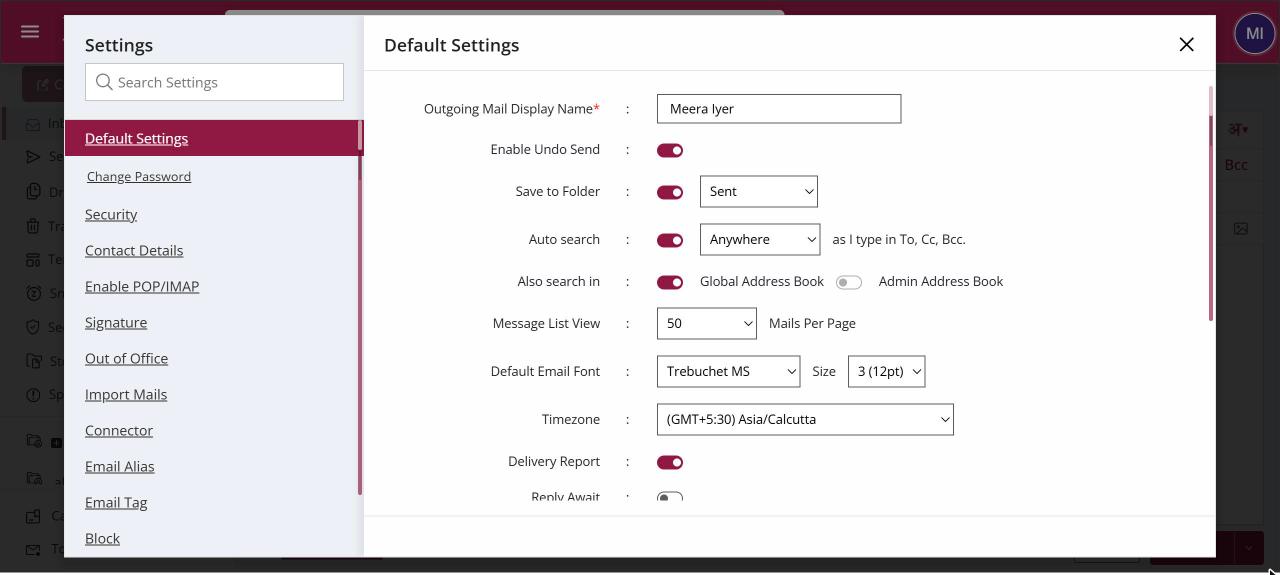
The Default Settings section holds the everyday preferences for your mailbox, such as your outgoing display name, undo send, where sent mail is saved, mails per page, the default font, time zone, delivery and read-receipt defaults, multiple login and what happens when you delete. Open it from Settings. Every change saves as soon as you make it.
For: EveryoneWeb
How to what's in default settings
Where: Settings › Default Settings
- Click your profile picture and choose Settings.
- Open Default Settings.
- Change any option. Look for the confirmation banner that it was updated.
When to use it
Divya in sales sets 100 mails per page, Verdana as her default font and turns on undo send, all from one screen.
Options
| Option | What it does |
|---|---|
| Outgoing Mail Display Name | The name recipients see, up to 30 characters. |
| Enable Undo Send | Gives you a few seconds to stop a mail after clicking Send. |
| Save to Folder | Saves a copy of sent mail, in Sent or a folder you choose. |
| Auto search | Suggests addresses as you type in To, Cc and Bcc, and where to search. |
| Message List View | Mails per page, from 10 to 100. |
| Default Email Font | The font and size new mails start with. |
| Timezone | The time zone used for dates in your mailbox. |
| Delivery Report, Reply Await, Read Receipt | Default tracking options for new mails. Delivery Report needs your administrator to allow it. |
| Multiple Login | Whether your account can be open in several places at once. |
| Mail List | Shows the mail list while you read a mail. |
| Mail Confirmation | Shows a confirmation after a mail is sent. |
| Chat Window | Shows the chat window, if chat is available to you. |
| On delete | Move deleted mail to Trash, or only mark it as deleted. |
| Show right click menu | Turns the XgenPlus right-click menu on or off. |
| Notification Tone | Plays a sound when new mail arrives. |
Good to know
- Your administrator can hide some options, such as the time zone.
Was this page helpful?
Updated 2026-10-28