

Set an out of office reply
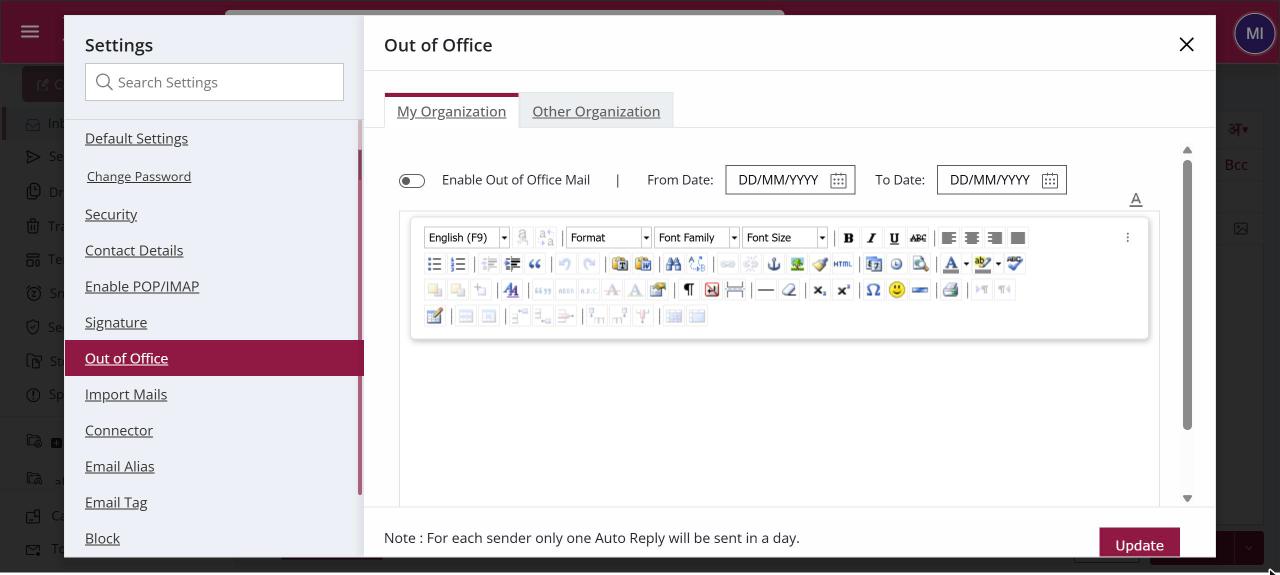
To set an out of office reply, open Settings › Out of Office. On the My Organization tab tick Enable Out of Office Mail, set the From and To dates, write the message and click Update. Repeat on the Other Organization tab for outside senders. Each sender gets at most one reply a day.
How to set an out of office reply
Where: Settings › Out of Office
- Click your profile picture at the top right, then Settings, and open Out of Office.
- On the My Organization tab, tick Enable Out of Office Mail.
- Choose the From Date and To Date and type the message for colleagues.
- Click Update.
- Open the Other Organization tab and repeat with the message for customers and other outside senders.
When to use it
Rohit, a developer at acme.in, is on leave for a week. Colleagues get "I'm on leave till 14 March. For build issues, please contact Anita." Customers get "Thank you for your mail. I'm away till 14 March. For urgent matters, write to support@acme.in."
Options
| Option | What it does |
|---|---|
| Enable Out of Office Mail | Turns the reply on for that audience. Each tab has its own switch. |
| From Date / To Date | The days the reply is active. Past dates are not allowed, and the To Date can't be earlier than the From Date. |
| Message | The reply text. You can format it like a normal mail. |
Good to know
- The two tabs work independently. You can turn on the reply only for outside senders, only for colleagues, or for both.
- For each sender only one automatic reply is sent in a day, so people who write often are not flooded.
- To reply automatically only to certain senders or subjects, use a rule with the Auto Reply action instead.
Common questions
Can colleagues and customers get different replies?
Yes. The My Organization tab sets the reply for senders inside your organisation and the Other Organization tab sets the reply for everyone else. Each tab has its own dates and message.
Will someone who mails me five times get five replies?
No. Each sender gets only one automatic reply in a day.
Why can't I see Out of Office in Settings?
Your administrator can hide this section. Ask them to make it available.