

Stop recipients forwarding or printing
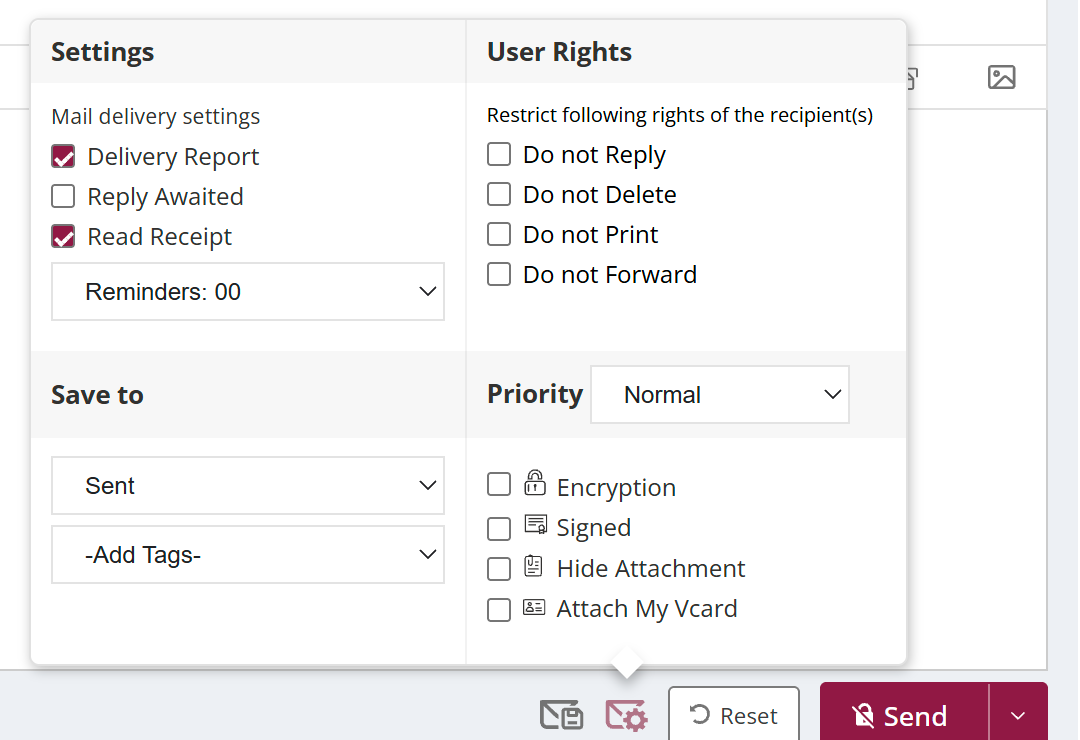
To restrict what colleagues can do with a mail, open Classic compose, click the settings icon (hover text Advance settings) and, under User Rights, tick Do not Reply, Do not Delete, Do not Print or Do not Forward. Recipients in your organisation then cannot do those things in XgenPlus. Rights work only for internal recipients and need permission from your admin.
How to stop recipients forwarding or printing
- Click the arrow next to Compose Mail, turn on Classic and click Compose Mail.
- Add internal recipients and write the mail.
- Click the settings icon (hover text Advance settings).
- Under User Rights, tick the actions to block, for example Do not Forward and Do not Print.
- Send the mail.
When to use it
The company secretary sends draft quarterly results to the directors with Do not Forward and Do not Print ticked. The directors can read the mail but cannot pass it on or print it before the board meeting.
Options
| Right | What the recipient cannot do |
|---|---|
| Do not Reply | Reply to the mail. |
| Do not Delete | Delete the mail. |
| Do not Print | Print the mail. |
| Do not Forward | Forward the mail. |
Good to know
| Situation | Can you set rights? |
|---|---|
| Recipients in your organisation | Yes |
| Recipients outside your organisation | No, remove them first |
| A contact group in To | No |
| PGP encryption or signing on the same mail | No, choose one |
| Group Mail, or sending through a custom outgoing server | No |
- User Rights are in Classic compose. To switch, click the arrow next to Compose Mail and turn on Classic.
Common questions
Can I use rights on mail to Gmail or other outside addresses?
No. Rights work only for recipients on your organisation's XgenPlus. XgenPlus asks you to remove other recipients first.
Can I change the rights after sending?
Yes. Open the mail in Sent and use Rights to change or remove them.
Why can't I see User Rights?
Your domain admin must enable the Rights feature for your account. Once it is enabled, using it is your choice.