

Recall a sent mail
To recall a mail, open it in Sent, click Recall Mail, tick the recipients who have not read it yet and click Recall. XgenPlus deletes the mail from their mailboxes and logs the recall. It works only for recipients on your organisation's XgenPlus server who have not opened the mail.
How to recall a sent mail
- Open Sent and click the mail you want to take back.
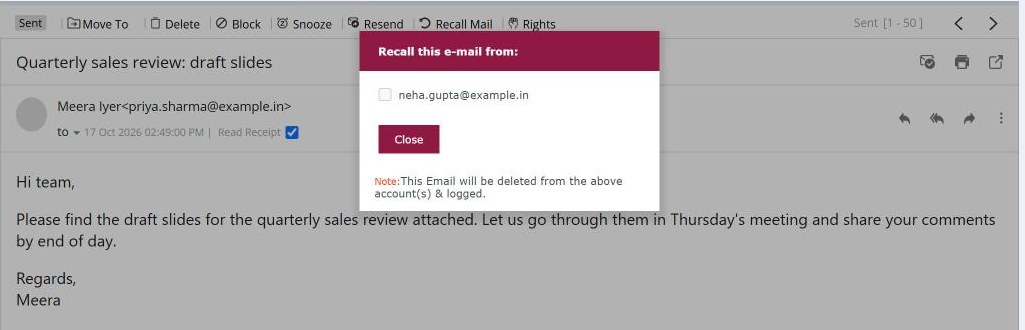
- Above the mail, click Recall Mail. A list titled Recall this e-mail from opens.
- Tick the recipients to recall it from. Anyone who has already read the mail is greyed out.
- Click Recall. The mail is deleted from their mailboxes and a Recalled icon appears next to it in Sent.
When to use it
Meera in HR sends the salary revision sheet to the whole team instead of only the managers. She opens the mail in Sent, recalls it from the colleagues who haven't opened it yet, and sends it again to the right list.
Good to know
| Situation | Can you recall it? |
|---|---|
| Recipient in your organisation, not yet opened | Yes |
| Recipient already opened the mail | No, shown greyed out |
| Recipient outside your organisation | No |
| Mail already recalled once | No, the option is hidden |
Common questions
Can I recall a mail sent to Gmail or another outside address?
No. Recall works only for recipients whose mailbox is on your organisation's XgenPlus server. For outside recipients, turn on Undo send so you get a few seconds to stop a mail after clicking Send.
How do I see who a mail was recalled from?
In Sent, click the Recalled icon next to the mail. It lists the addresses the mail was recalled from.
Will the recipient know I recalled the mail?
The mail is removed from their mailbox. If they had not opened it, they will not see it.