

Ask for a read receipt
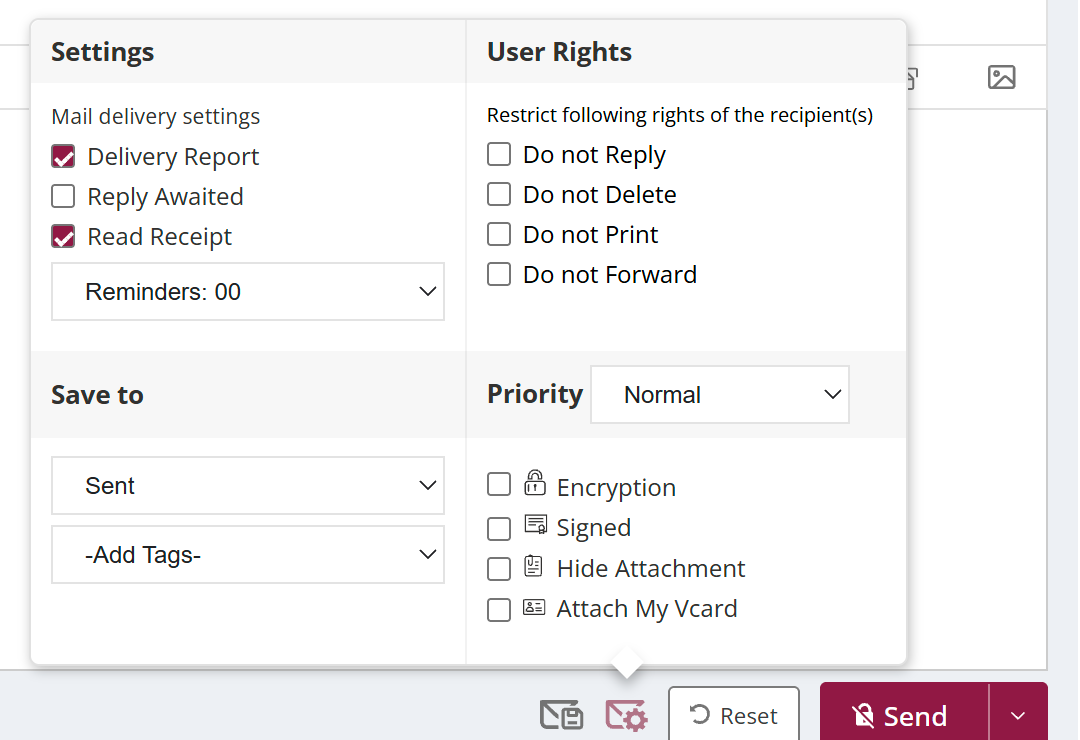
To ask for a read receipt, click the Read Receipt icon at the bottom of the compose window so it is highlighted, then send. When the recipient opens the mail, their mail app is asked to send you a receipt. Not every mail app does, so no receipt does not always mean the mail is unread.
For: EveryoneWeb
How to ask for a read receipt
- In the compose window, click the Read Receipt icon so it is highlighted.
- Send the mail.
When to use it
Pallavi in recruitment sends an offer letter and asks for a read receipt, so she knows when the candidate has opened it and can call to follow up.
Good to know
- The Read Receipt checkbox asks for a receipt to be sent to you. It does not hide or suppress one.
- A read receipt is different from a delivery report, which only confirms the mail reached the server.
Common questions
Can I ask for a read receipt on every mail?
Yes. Turn on Read Receipt under Settings › Default Settings.
Where is the option in Classic compose?
Tick the Read Receipt checkbox in the compose window.
Was this page helpful?
Updated 2026-10-28