

Create an app password
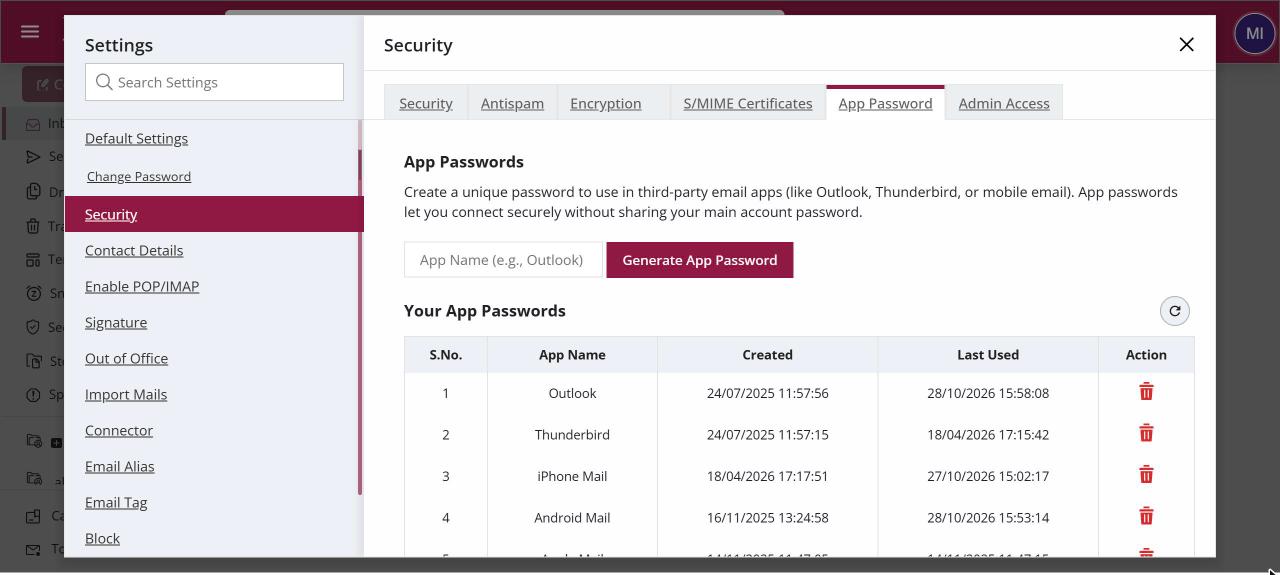
To create an app password, open Settings › Security › App Password, type a name such as "Outlook-Laptop" and click Generate App Password. Copy the password that appears and paste it into your mail app instead of your normal password. You can have up to 10 active app passwords and revoke any one of them at any time.
For: EveryoneWebSecurity
How to create an app password
Where: Settings › Security › App Password
- Click your profile picture, choose Settings, open Security and then the App Password tab.
- Type a name for the app or device, such as "iPhone-Mail".
- Click Generate App Password.
- Copy the password from the pop-up. It is shown only once.
- Paste it as the password in your mail app's account settings.
When to use it
Imran uses Outlook on his laptop and the mail app on his iPhone. He creates "Outlook-Laptop" and "iPhone-Mail". When his phone goes missing, he revokes only "iPhone-Mail" and keeps working in Outlook.
Options
| Column | What it shows |
|---|---|
| App Name | The name you gave. Use letters, digits and @ - _ ., up to 50 characters. |
| Created | When you made it. |
| Last Used | When an app last signed in with it. An old date may mean you can revoke it. |
| Revoke | Deletes the app password after you confirm. The app stops working until you give it a new one. |
Good to know
- You can keep up to 10 active app passwords.
- Give each device its own app password, so you can revoke one without touching the others.
- Use an app password whenever you turn on two-step login, because mail apps cannot ask for a code.
Common questions
How do I stop a lost phone from reading my mail?
Open the App Password tab and revoke that phone's entry. Your other apps keep working.
I lost the password before copying it. What now?
Revoke that entry and generate a new one. XgenPlus never shows an app password a second time.
Was this page helpful?
Updated 2026-10-28