

Write a mail with AI Compose
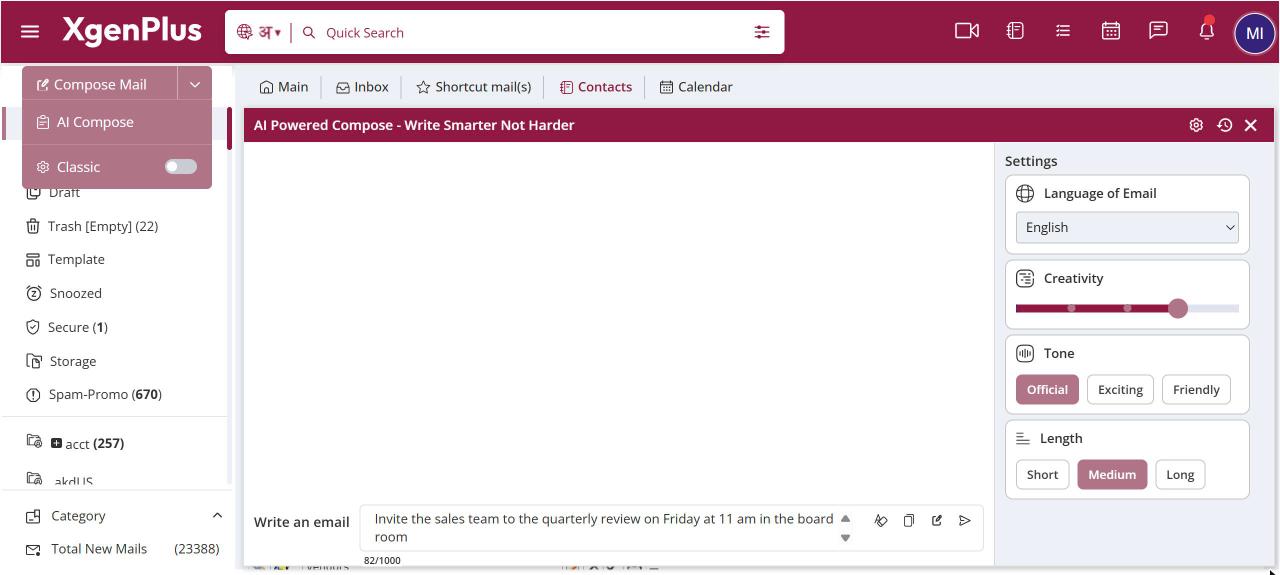
To draft a mail with AI, click the arrow next to Compose Mail and choose AI Compose. Type what the mail should say in Write an email, pick the language, tone and length in settings, and click the send arrow. Then click Send to Compose to open the draft in a new mail, or copy it.
How to write a mail with ai compose
- Click the arrow next to Compose Mail and choose AI Compose. A panel opens.
- Click the settings (gear) icon and choose Language of Email, tone, length and creativity.
- Type what the mail should say in Write an email, for example "request two days' leave on 5 and 6 November for a family function".
- Click the send arrow. The draft appears in the panel.
- Click Send to Compose to open it in a new mail, or use Copy to copy it as HTML or text.
When to use it
Sunita, a field officer in Lucknow, types "request two days' leave on 5 and 6 November for a family function", chooses Hindi, Official and Short, and gets a polite leave application in Hindi. She clicks Send to Compose, adds her manager's address and sends it.
Options
| Option | What it does |
|---|---|
| Language of Email | English, Hindi, Assamese, Bangla, Gujarati, Kannada, Marathi or Punjabi. |
| Tone | Official, Exciting or Friendly. |
| Length | Short (about 500 words), Medium (about 1,000 words) or Long (about 2,000 words). These are approximate and a draft can come out a little shorter or longer. |
| Creativity | A slider for how freely the mail is worded. |
| Copy ▾ | Copy as HTML keeps formatting, Copy as Text copies plain text. |
| Send to Compose | Opens a new compose window with the draft in the body. |
| Clear | Empties the prompt box. |
Good to know
- The prompt box takes up to 1,000 characters. A counter shows how many you have used.
- Earlier drafts stay in a history list in the panel. Clear All removes them.
- The draft uses your display name.
- To reply to a mail with AI, use AI Reply in the reply window instead.
Common questions
Which languages can AI Compose write in?
English, Hindi, Assamese, Bangla, Gujarati, Kannada, Marathi and Punjabi.
Why can't I see AI Compose?
Your domain administrator can turn AI Compose off for your organisation. Ask your admin if the option is missing.
Should I check the draft before sending?
Yes. Always read the draft, check names, dates and figures, and edit it in the compose window before you click Send.