

Add an email alias
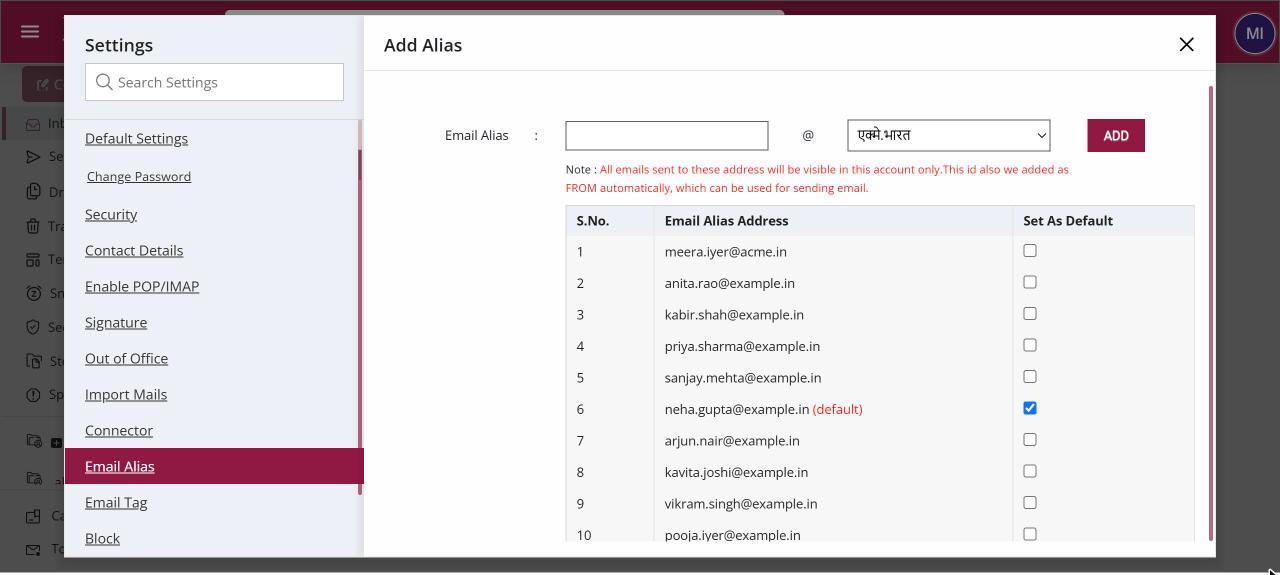
To add an email alias, open Settings › Email Alias, type the alias name, pick the domain and click Add. Mail sent to the alias arrives in your mailbox, and the alias is added to your From list automatically. Click Set As Default next to an alias to send from it by default.
How to add an email alias
Where: Settings › Email Alias
- Click your profile picture, then Settings, and open Email Alias.
- Type the alias name and choose the domain from the list.
- Click Add. The alias appears in the Add Alias list.
- To send from it by default, click Set As Default next to it.
When to use it
Rohit heads sales for the north region at acme.in. He adds sales.north@acme.in as an alias, so regional enquiries land in his own Inbox, and replies to them go out from sales.north@acme.in.
Good to know
- An alias is another address for the same mailbox. To send from an address that belongs to a different mailbox or another provider, add it as another email id from the From list in Compose instead.
- If you have an address in an Indian language, set up Auto downgrading of Email on the same screen so mail still reaches servers that only accept English addresses.
- Remove an alias you no longer need from the Add Alias list.
Common questions
Can I create an alias in Hindi or another Indian language?
Yes, if your organisation has a domain in that language. While typing, press the spacebar to convert the text into the domain's language, and Ctrl+G to switch between English and that language.
Which domains can I choose?
Only the alias domains your administrator has set up for your organisation.
Why can't I see Email Alias in Settings?
Your administrator can hide this section. Ask them if you need an alias.