

Create a contact group
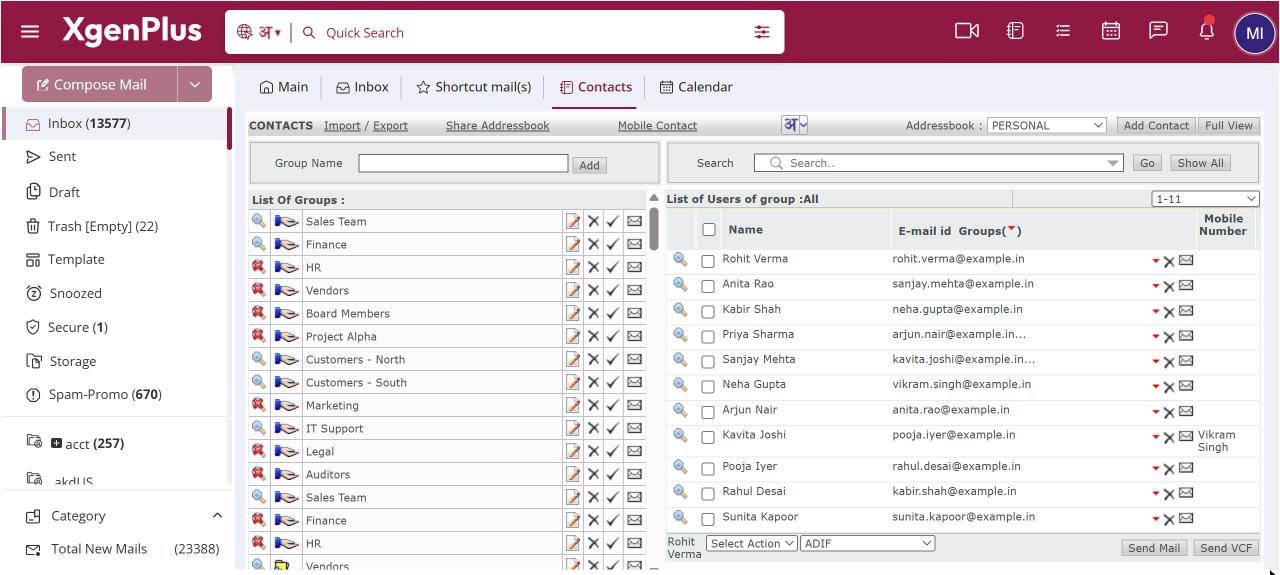
To create a group, open Contacts, type a name in the Group Name box and click Add. The group appears under List Of Groups. Add contacts to it from the contact form or by copying them from another group. Names can be up to 20 characters. Every address book also has a built-in GENERAL group.
For: EveryoneWebTime-saving
How to create a contact group
- Open Contacts from the top bar.
- Type a name in the Group Name box and click Add.
- Click the group under List Of Groups to see its members.
- Use the pencil icon to rename the group or the bin icon to delete it.
When to use it
Anita in HR at acme.in creates NEW-JOINERS-2026, PANEL-INTERVIEWERS and CAMPUS-TPO, so she can reach each audience in one click.
Good to know
- Group names are saved in capital letters. They can use letters in any language, numbers, hyphens and underscores.
- A contact can be in several groups.
- Deleting a group that has contacts warns you how many contacts it will delete.
- GENERAL cannot be renamed or deleted. The names INVALID and UNSUBSCRIBE are reserved.
- Each group shows how many contacts it has.
Common questions
Why does it say the group name is already in use by domain?
Your organisation already has a group with that name. Choose a different name.
Was this page helpful?
Updated 2026-10-28