

Mail a contact group in one click
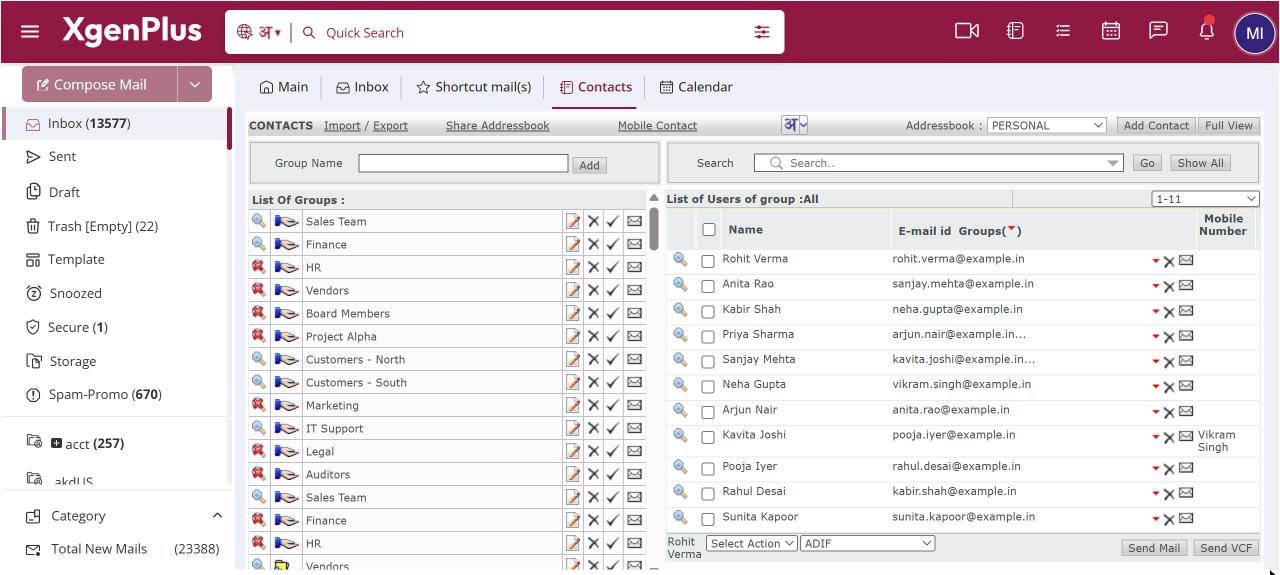
To mail a group, open Contacts and, under List Of Groups, click the envelope icon next to the group. A new mail opens with the group as one recipient in To. Write and send it, and XgenPlus delivers it to every member. You can also type the group name in To in any new mail.
For: EveryoneWebTime-saving
How to mail a contact group in one click
- Open Contacts from the top bar.
- Under List Of Groups or Shared Groups, click the envelope icon next to the group.
- Write your mail in the compose window that opens.
- Click Send.
When to use it
The principal of a school clicks the envelope beside CLASS-10-PARENTS and sends the exam timetable to 180 parents without picking a single address.
Good to know
- If the group has no contacts, you see "There is no user in this group".
- Blocked contacts in the group are left out.
- Groups shared with you can be mailed in the same way.
Common questions
Will members see each other's addresses?
The group goes as one recipient, and XgenPlus adds the members when the mail is sent. To send each member a separate personal copy, use group mail in compose.
Was this page helpful?
Updated 2026-10-28