

Open Storage and find your files
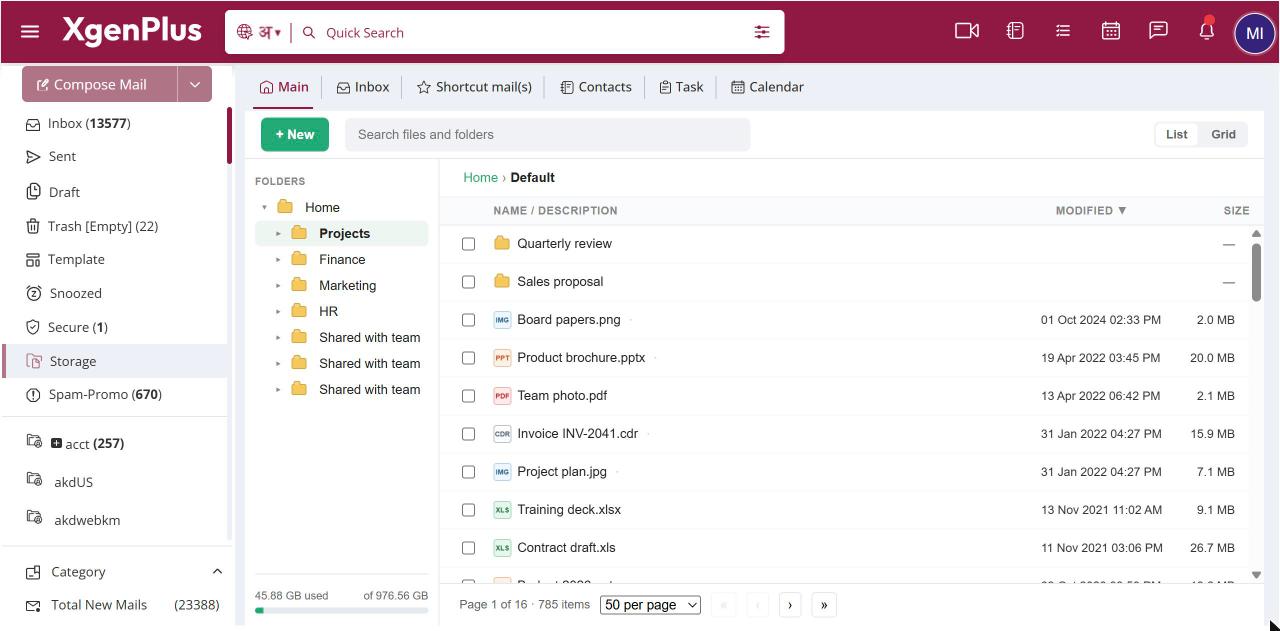
To open Storage, click the Storage folder in the left pane of your mailbox. Your folders are on the left and the files in the current folder on the right. Switch between List and Grid at the top right. The bar under the folder tree shows how much space you have used out of your total.
For: EveryoneWebAndroid
How to open storage and find your files
- In the left pane of your mailbox, click Storage.
- Click a folder in the tree, or double-click it in the list, to open it. Use the path at the top to go back up.
- Click List or Grid at the top right to change how files are shown.
- Tick files, or right-click one, to see what you can do with it.
When to use it
Rohit keeps Price Lists, Contracts and Brochures folders in Storage. He switches to Grid view to spot the latest brochure PDF at a glance.
Options
| Option | What it does |
|---|---|
| List | Rows with file type, name and note, modified time and size. Click a column heading to sort. |
| Grid | Small icons, like a desktop file explorer. Your browser remembers the choice. |
| Folder tree | Your Home folder and every folder under it. |
| Selection bar | Appears when you tick files, with Open, Rename, View, Move, Download, Send link and Delete. |
| Usage bar | Space used out of your total. |
Good to know
- Modified times are shown in your own time zone.
- Storage follows the light or dark theme you use for mail.
- The same space limit applies to uploads, to files you copy from mail and to files others upload back to you.
Common questions
How much space do I have?
Look at the usage bar under the folder tree, for example "7.84 GB of 15 GB". Your administrator sets the limit.
What happens when Storage is full?
You cannot upload or copy more files until you free up space. You see "Your account is full. You cannot upload a file."
Was this page helpful?
Updated 2026-10-28