

Act on a mail from the list on iPhone
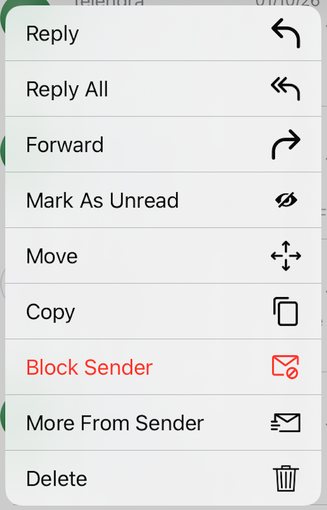
In the XgenPlus iPhone app, press and hold a mail in the list. A menu opens with Reply, Reply All, Forward, Mark As Unread, Move, Copy, Block Sender, More From Sender and Delete. Tap the action you want. Tap outside the menu to close it without doing anything.
For: EveryoneiPhoneTime-saving
How to act on a mail from the list on iPhone
- Open a folder such as Inbox in the app.
- Press and hold the mail you want.
- Tap an action in the menu that opens.
When to use it
Rohit gets a promotional mail from an unknown sender on his iPhone. He presses and holds it, taps Block Sender, and the sender's mail stops reaching him.
Actions
| Action | What it does |
|---|---|
| Reply / Reply All | Answer the sender, or the sender and everyone on the mail. |
| Forward | Send the mail on to someone else. |
| Mark As Unread | Mark the mail as not yet read. |
| Move / Copy | Put the mail, or a copy of it, in another folder. |
| Block Sender | Stop mail from this sender reaching you. |
| More From Sender | List other mails from the same sender. |
| Delete | Move the mail to Trash. |
Good to know
- To undo a block, open the menu and tap Unblock Email/Domain.
Was this page helpful?
Updated 2026-10-29