

Attach your business card
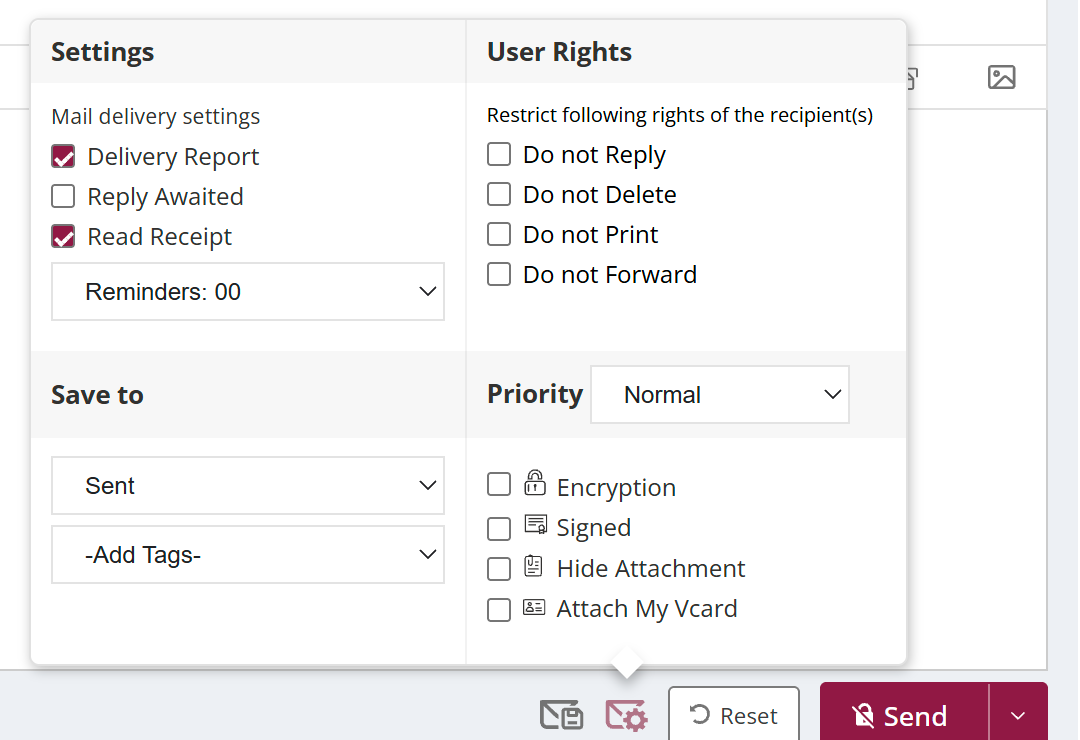
To send your business card, open Classic compose, click the settings icon (hover text Advance settings) and tick Attach My Vcard. A preview of your card shows the details that will be sent, and you can click Attach. The card goes as a .vcf file that recipients can add to their contacts in one click.
For: EveryoneWebClassic compose● Unique to XgenPlus
How to attach your business card
- Click the arrow next to Compose Mail, turn on Classic and click Compose Mail.
- Click the settings icon (hover text Advance settings).
- Tick Attach My Vcard.
- Check the business card preview and click Attach.
- Send the mail.
When to use it
Nisha has joined as an account manager. In her introduction mail to key clients she attaches her vCard, so they can save her number and address straight into their phones.
Good to know
- This option is in Classic compose. To switch, click the arrow next to Compose Mail and turn on Classic.
Was this page helpful?
Updated 2026-10-28