

See all your contacts in one list
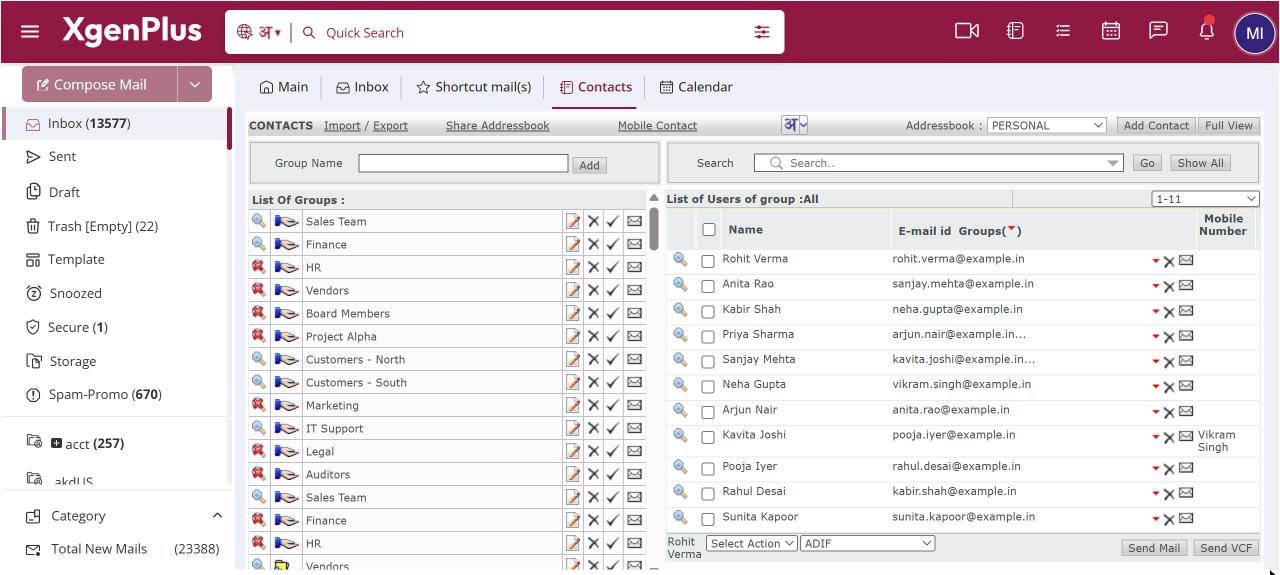
To see everything in one list, open Contacts and click Full View. Tick Show Global Address Book, Show Admin Address Book or Show Incomplete Addresses as needed, then click the plus sign next to a group to expand it. Use the Action list to delete, block or move contacts. Click Group View to go back.
For: EveryoneWeb
How to see all your contacts in one list
- Open Contacts and click Full View.
- Tick Show Global Address Book, Show Admin Address Book or Show Incomplete Addresses.
- Click the plus sign next to a group to see its contacts.
- Tick contacts and use the Action list, or click an address to mail it.
- Click Group View to return to the normal view.
When to use it
Rohit, a field sales manager, opens Full View with the global address book on, expands DEALERS-WEST and checks every dealer's details on one screen.
Options
| Option | What it does |
|---|---|
| Show Global Address Book | Adds everyone in your organisation's directory. |
| Show Admin Address Book | Adds the address book your administrator publishes. |
| Show Incomplete Addresses | Adds contacts with a missing or incomplete address. |
| Select to Add | Adds a new Group or Contact. |
| Action | Delete, Block, Unblock, Move to Group or Copy to Group. |
Good to know
- The global and admin address books appear only if your administrator has turned them on.
- Full View also has links to import and export contacts and to send a request for updation to a group.
Was this page helpful?
Updated 2026-10-28