

Find your way around the app menu
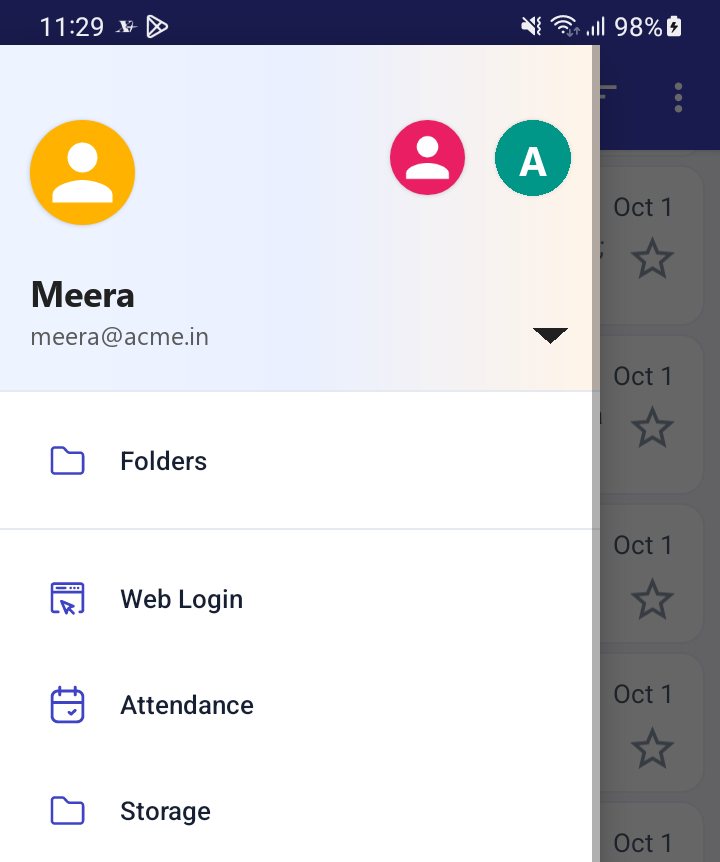
Open the menu by swiping from the left edge or tapping the menu icon. It shows your account, Unified Inbox, your folders and, for XgenPlus accounts, extra tools such as Web Login and Storage. The bottom bar has Logout and Settings. Items you do not see are not turned on for your account.
For: EveryoneAndroid
How to find your way around the app menu
Where: Swipe from the left edge, or tap the menu icon
- Swipe in from the left edge or tap the menu icon at the top left.
- Tap a folder, or an item such as Web Login or Refresh Account.
- For settings or to sign out, use Settings or Logout in the bar at the bottom.
When to use it
Anita cannot find Web Login on her Gmail account. It only appears on her XgenPlus account, so she switches to it and the item is there.
Options
| Item | Shown when | What it opens |
|---|---|---|
| Account header | Always | Account list and Add New Account |
| Unified Inbox | Turned on in settings, and you have 2 or more accounts | Inbox of all accounts |
| Folders | Always | Your folders with unread counts. Tap to open or collapse. |
| Web Login | XgenPlus account, if your organisation supports it | Login code for webmail |
| Storage | XgenPlus account | Your XgenPlus storage |
| Sync Setting, Notifications, Help | XgenPlus account | Sync, alert list and support |
| Refresh Account | Always | Re-reads your account settings |
| Change Language | Always | Language list |
| Manage folders | Always | Create and set up folders |
| About Us | Always | Version and about text |
| Logout | Always, bottom bar | Removes the account from the phone |
| Settings | Always, bottom bar | App and account settings |
Good to know
- Other items such as attendance, leads and Secret Keeper appear when your organisation enables them. Their own pages explain them.
- The folder list order is Inbox, Outbox, Sent, Drafts, Trash, Spam and Snoozed first, then your other folders in alphabetical order.
- Video Tutorials is on the Help screen, not in the menu.
Was this page helpful?
Updated 2026-10-28