

Find your way around the mailbox
After you log in, XgenPlus opens your Inbox. The top bar has the menu icon, Quick Search, notifications and your account menu. The left pane lists Compose Mail, your folders, smart categories and Total New Mails. Mail, folders, search results and compose open in tabs in the main area. Click the ☰ icon to hide or show folder names.
For: EveryoneWeb
How to find your way around the mailbox
- Log in. Your Inbox opens in its own tab.
- Click a folder or category in the left pane to open it in the main area.
- Click the ☰ icon at the far left of the top bar to hide folder names and widen the mail list. Click it again to show them.
- Click Total New Mails at the bottom of the left pane to see every unread mail.
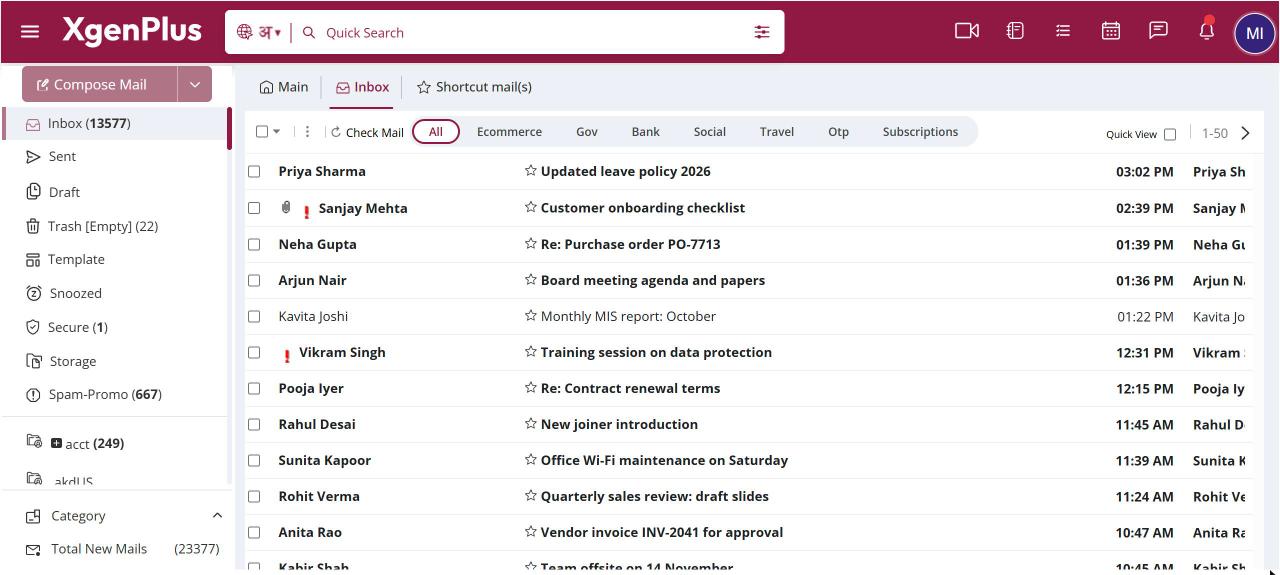
When to use it
Ramesh in finance keeps the Inbox tab open while he opens Sent in the main tab to check a vendor reply. On his small laptop he hides the folder names so the subject lines fit.
Parts of the screen
| Part | What it does |
|---|---|
| ☰ (Hide/Show Folders Names) | Collapses the left pane to give the mail list more width. |
| Quick Search | Searches your mail. Type a few letters to see suggestions, press Enter for full results. |
| Notifications bell | Lists your notifications, such as new mail. |
| Account menu (your picture) | Home, Settings, theme, Help and Logout. |
| Compose Mail | Starts a new mail. The arrow next to it opens AI Compose and Classic. |
| Folders | Inbox, Sent, Drafts, Trash and your own folders, with unread counts. |
| Category | Smart views such as High Priority and Today's Mail. |
| Total New Mails (n) | The number of unread mails in all folders. Click to list them. |
| Tabs | Inbox stays in its own tab. Other folders, searches and open mails use the main tab. |
Good to know
- Folder unread counts are shown next to each folder. A count of zero is hidden.
- Your theme colour and dark or light mode apply to the whole mailbox.
Common questions
What does "Unable to reach Xgen" mean?
Your internet connection dropped. Check the connection and click Try Again.
How do I see unread mail from all folders together?
Click Total New Mails in the left pane. It lists every unread mail across your folders.
Was this page helpful?
Updated 2026-10-28