

Show public and office holidays
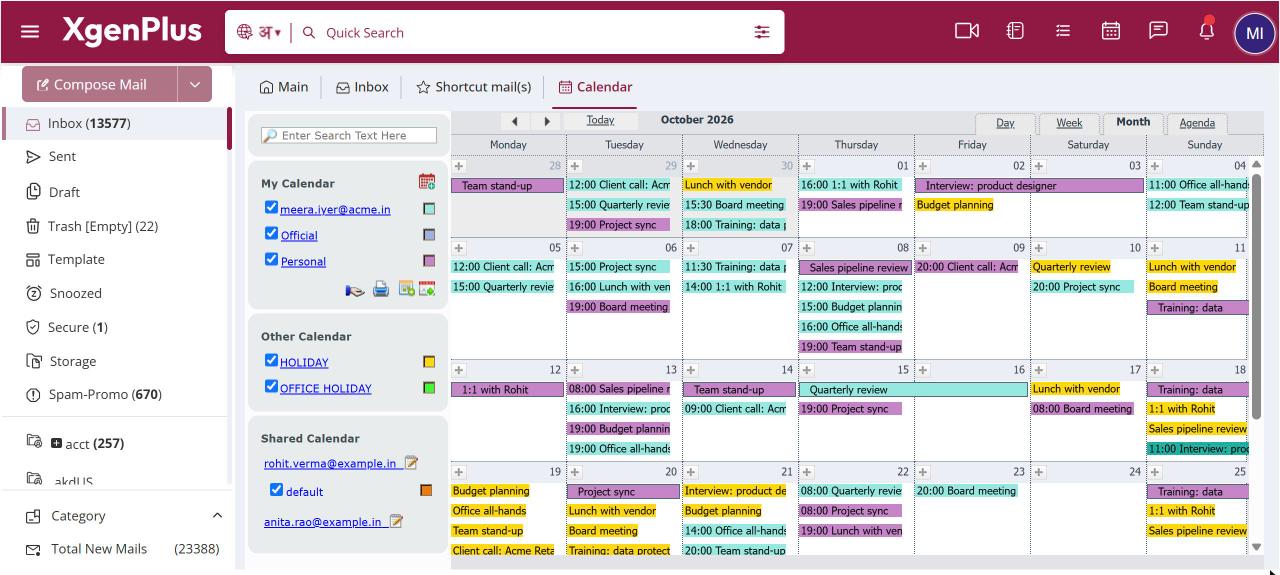
To see holidays, open Calendar and, under Other Calendar in the left pane, tick HOLIDAY for public holidays in your country or OFFICE HOLIDAY for holidays your organisation declares. They appear on top of your own events. Click the colour swatch to change their colour. Your administrator maintains the office holiday list.
For: EveryoneWeb
How to show public and office holidays
- Open Calendar from the top bar.
- In the left pane, under Other Calendar, tick HOLIDAY, OFFICE HOLIDAY or both.
- Optionally click the colour swatch next to each one to change its colour.
When to use it
The HR team at acme.in ticks OFFICE HOLIDAY so that the Diwali and Independence Day closures declared by the company show up next to their interview schedule.
Options
| Calendar | What it shows |
|---|---|
| HOLIDAY | Public holidays for your country, for the current year. |
| OFFICE HOLIDAY | Holidays your organisation has declared, for your domain or for every domain on the server. |
Good to know
- You cannot add or edit holidays yourself. Ask your administrator if an office holiday is missing.
- XgenPlus remembers which holiday calendars you ticked and the colours you chose.
Was this page helpful?
Updated 2026-10-28