

Switch between day, week and month view
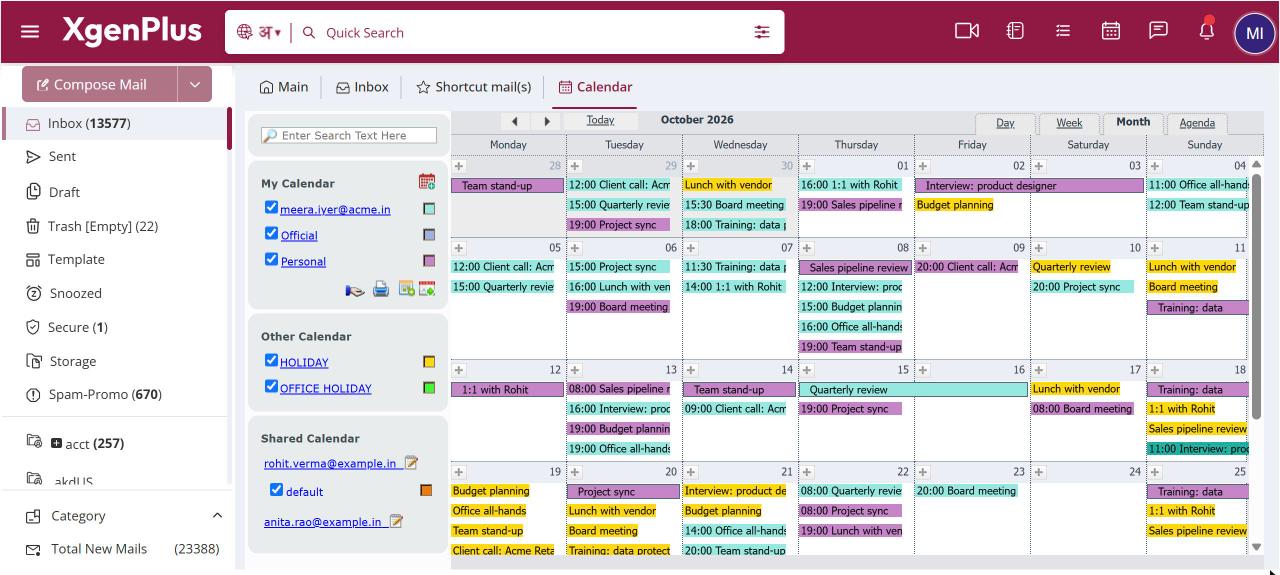
To change the view, click the Calendar icon in the top bar, then click Day, Week, Month or Agenda above the calendar grid. Use the arrows or Today to move through dates. Calendar opens in Month view, and the week always starts on Monday. Drag an event to move it, or drag its edge to change its length.
For: EveryoneWeb
How to switch between day, week and month view
- Click the Calendar icon in the top bar.
- Above the calendar grid, click Day, Week, Month or Agenda.
- Click the arrows to go back or forward, or click Today to return to the current date.
- To reschedule an event, drag it to a new slot. Drag its bottom edge to make it longer or shorter.
When to use it
Rohit, a sales manager at acme.in, opens Week view every Monday to see all his client calls. The demo for Thursday has moved, so he drags it to Friday at 3 pm.
Options
| View | What it shows |
|---|---|
| Day | One day, hour by hour. |
| Week | Monday to Sunday, hour by hour. |
| Month | The whole month. This is the view Calendar opens in. |
| Agenda | A list of upcoming events, one under the other. |
Good to know
- Double-click an empty slot, or drag across empty slots, to create an event there.
- Times move in 5-minute steps when you drag an event.
- The calendar follows the light or dark theme you use for mail.
- When you click View In Calendar on a meeting invite in a mail, Calendar opens on that date with the event open.
Common questions
Can I make the week start on Sunday?
No. The calendar week always starts on Monday.
Why do I see events that are not mine?
Holidays, office holidays and calendars that colleagues shared with you are shown on top of your own events, each in its own colour. Untick them in the left pane to hide them.
Was this page helpful?
Updated 2026-10-28