

Create a document, sheet or presentation
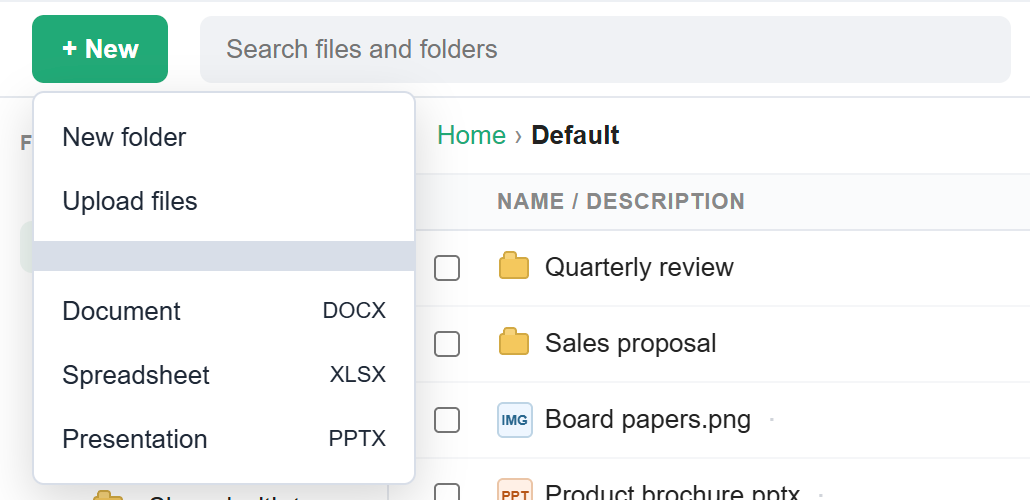
To create a document, open Storage, go to a folder, click + New and choose Document, Spreadsheet or Presentation. Enter a name. The new .docx, .xlsx or .pptx file opens in the editor straight away, and your changes save automatically. Later, click the file and choose Edit to carry on. Your administrator must turn on Office for you.
For: EveryoneWebTime-saving
How to create a document, sheet or presentation
- Open Storage and go to the folder for the new file.
- Click + New and choose Document, Spreadsheet or Presentation.
- Enter a name for the file.
- Type in the editor that opens. Your changes save automatically.
- To continue later, click the file in Storage and choose Edit.
When to use it
Anita, a team lead at example.in, creates "Q3 Hiring Plan.xlsx" in Team/Planning and starts filling in headcount numbers without leaving her mailbox.
Options
| Choice | Creates |
|---|---|
| Document | A Word file (.docx). |
| Spreadsheet | An Excel file (.xlsx). |
| Presentation | A PowerPoint file (.pptx). |
Good to know
- New files are named "Untitled" followed by the type unless you type a name.
- The files are ordinary Office files. You can download them and open them in Microsoft Office.
Common questions
Why don't I see Document, Spreadsheet or Presentation under + New?
Office editing is not turned on for your account or your domain. You can still view Office files. Ask your administrator to turn on Office.
For admins
Administrators control this feature for the whole domain:
Was this page helpful?
Updated 2026-10-28