

Bring in leads from Facebook, LinkedIn and Google
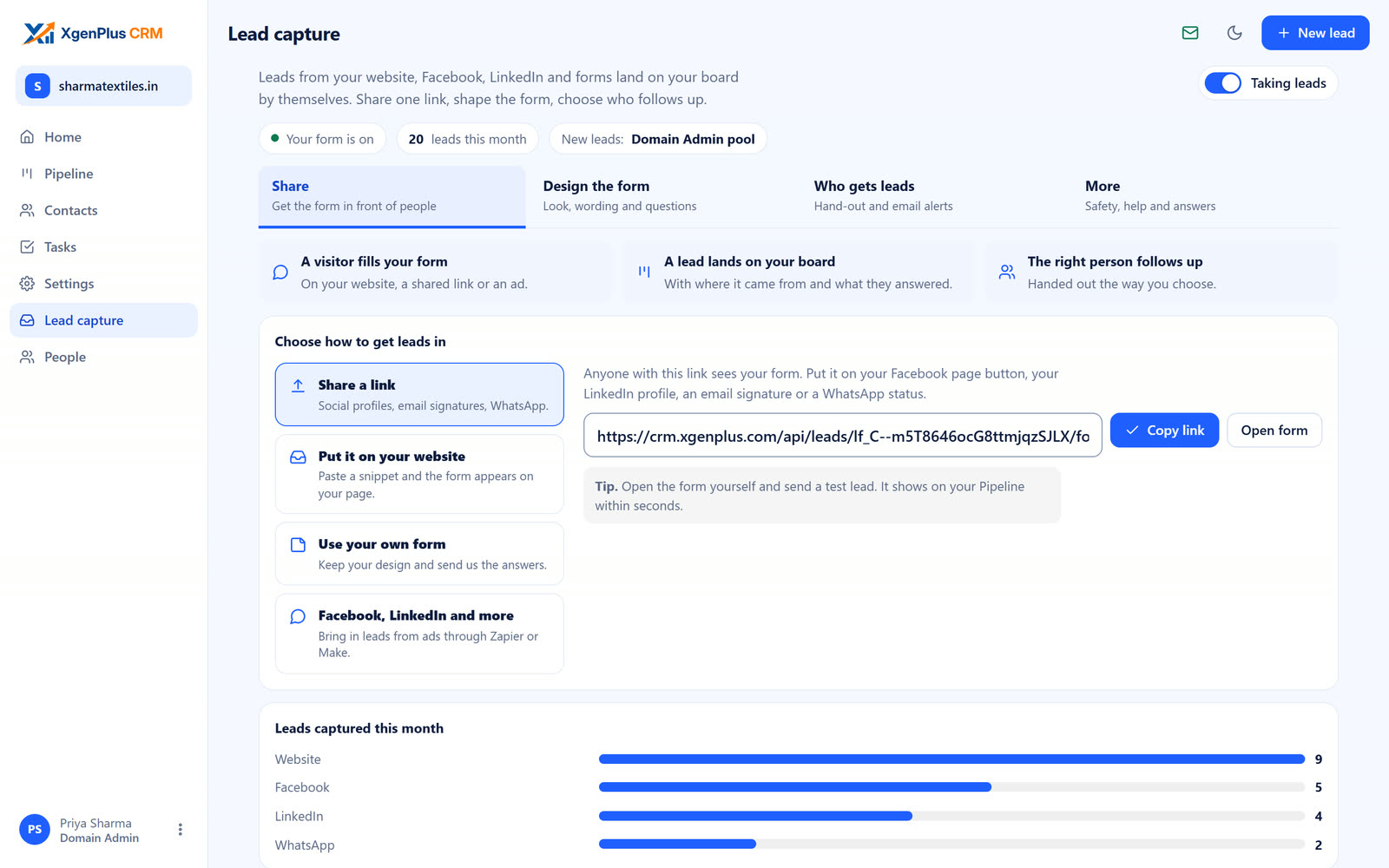
Facebook and LinkedIn do not connect directly. Open Lead capture in XgenPlus CRM, stay on the Share tab, choose Facebook, LinkedIn and more and select Copy endpoint. Then, in Zapier, Make or n8n, add a Webhooks POST step and give it that address.
For: adminWeb
How to bring in leads from Facebook, LinkedIn and Google
Where: crm.xgenplus.com › Lead capture › Share › Facebook, LinkedIn and more
- Open Lead capture from the menu on the left.
- Stay on the Share tab and choose Facebook, LinkedIn and more.
- Select Copy endpoint.
- In Zapier, Make or n8n, start from your ad's new-lead trigger and add a Webhooks step that does a POST to the endpoint.
- Send name, email and phone, and set the source to the network the lead came from.
- Run a test and look for the new lead on your Pipeline.
Where each kind of lead comes from
| Where the lead starts | What to do |
|---|---|
| Facebook and Instagram Lead Ads | Use the new-lead trigger. Send name, email and phone. Set the source to facebook or instagram. |
| LinkedIn Lead Gen Forms | Set the source to linkedin. Or download the leads as a file and use Contacts, then Import. |
| Google Ads lead forms | Set the source to google. |
| forms.xgenplus.com | Add the endpoint as a webhook on your form. Its answers arrive in the CRM. |
Good to know
- The Leads captured this month chart on the Share tab shows how many leads came from each source.
- Only the Domain Admin sets this up.
Common questions
Is there a direct Facebook or LinkedIn connection?
No. These networks send leads through an automation tool, so you use Zapier, Make or n8n. Free plans work for most people.
What source should I set?
facebook or instagram for Lead Ads, linkedin for Lead Gen Forms, google for Google Ads lead forms.
Can I bring LinkedIn leads in without an automation tool?
Yes. Download the leads as a file, then in Contacts choose Import.
Was this page helpful?
Updated 2026-11-29
