

Design your lead form
To design your lead form, open Lead capture in XgenPlus CRM and choose the Design the form tab. Change the name, heading, short note and colour, add up to 12 of your own questions, check the Preview and save your changes. Name and a phone number or email are always asked.
For: adminWeb
How to design your lead form
Where: crm.xgenplus.com › Lead capture › Design the form
- Open Lead capture from the menu on the left and choose the Design the form tab.
- Fill in Name shown on the form, Heading and Short note under the heading.
- Pick a Colour. Switch Show "Powered by XgenPlus" off if you do not want that line.
- Under Questions on the form, tick Ask for company or Ask "What are you looking for?", or choose Add a question.
- Check the Preview on the right. Select Open the full form to see it in full.
- Save your changes. The Preview refreshes to show the saved form.
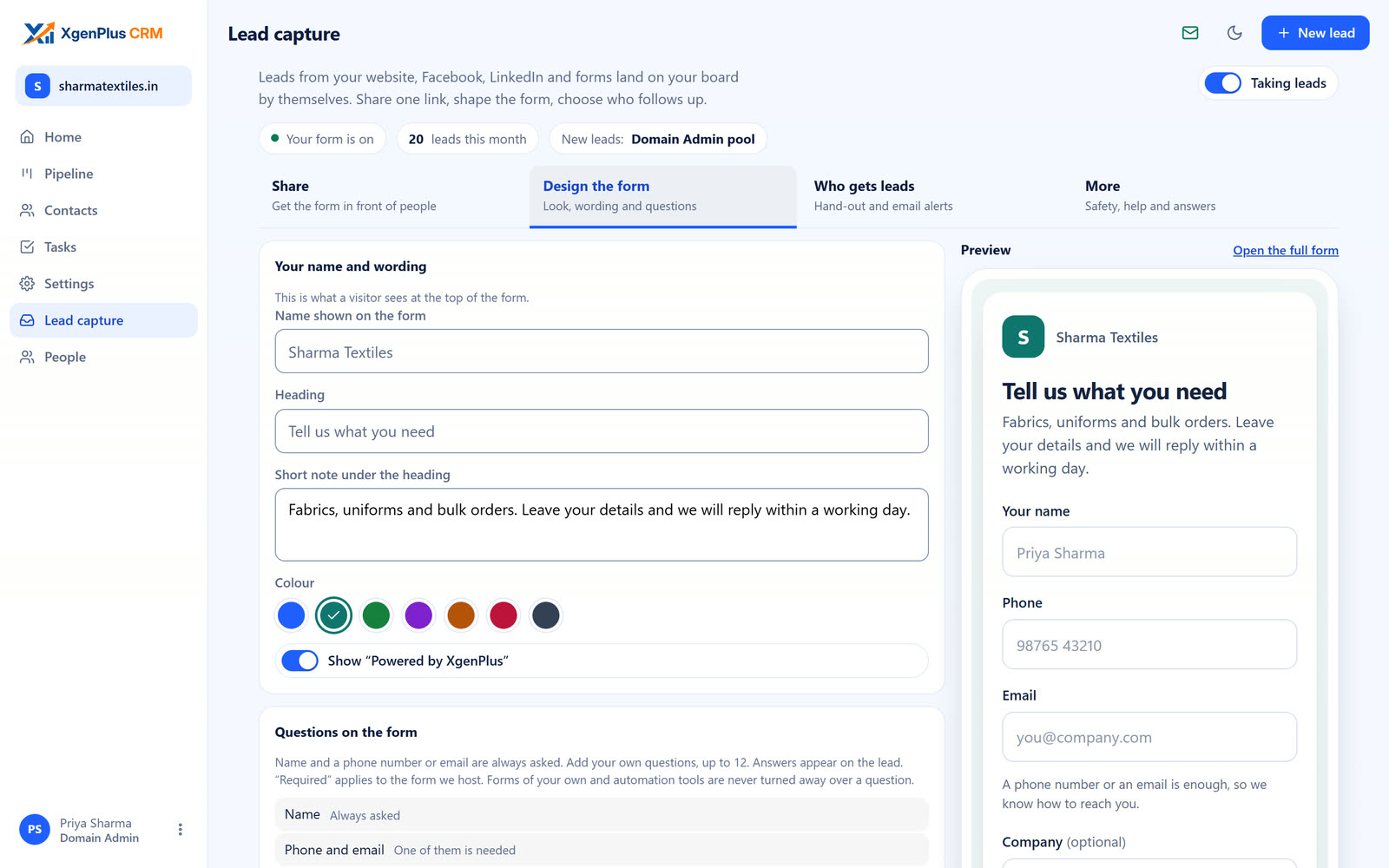
What you can change
| Option | What it does |
|---|---|
| Name shown on the form | Your business name at the top of the form. |
| Heading | The big line visitors read first. |
| Short note under the heading | A sentence or two, for example how fast you reply. |
| Colour | The colour of the form and its button. |
| Show "Powered by XgenPlus" | A switch for the small line at the bottom. |
| Ask for company | Adds an optional company question. |
| Ask "What are you looking for?" | Adds an optional message question. |
| Add a question | Adds your own question. You can add up to 12. |
Good to know
- Name is Always asked. Phone and email shows One of them is needed.
- The Preview shows your saved form at phone width. Save changes to refresh it.
- Only the Domain Admin designs the form.
Common questions
Which questions are always on the form?
Name, and a phone number or an email. The visitor needs to give one of the two.
How many questions of my own can I add?
Up to 12. Answers to them appear on the lead.
Does Required work everywhere?
No. Required applies only to the form we host. Forms of your own and automation tools are never turned away over a question.
Can I remove the Powered by XgenPlus line?
Yes. Switch off Show "Powered by XgenPlus".
Was this page helpful?
Updated 2026-11-29
