

Share responses with read-only viewers
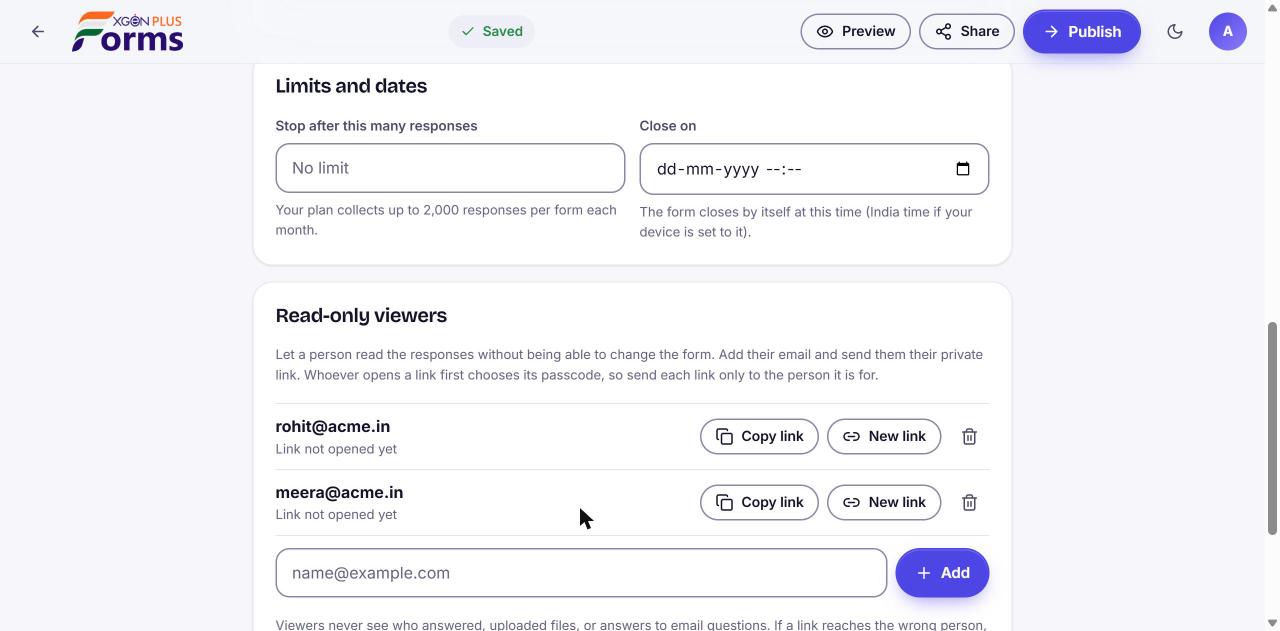
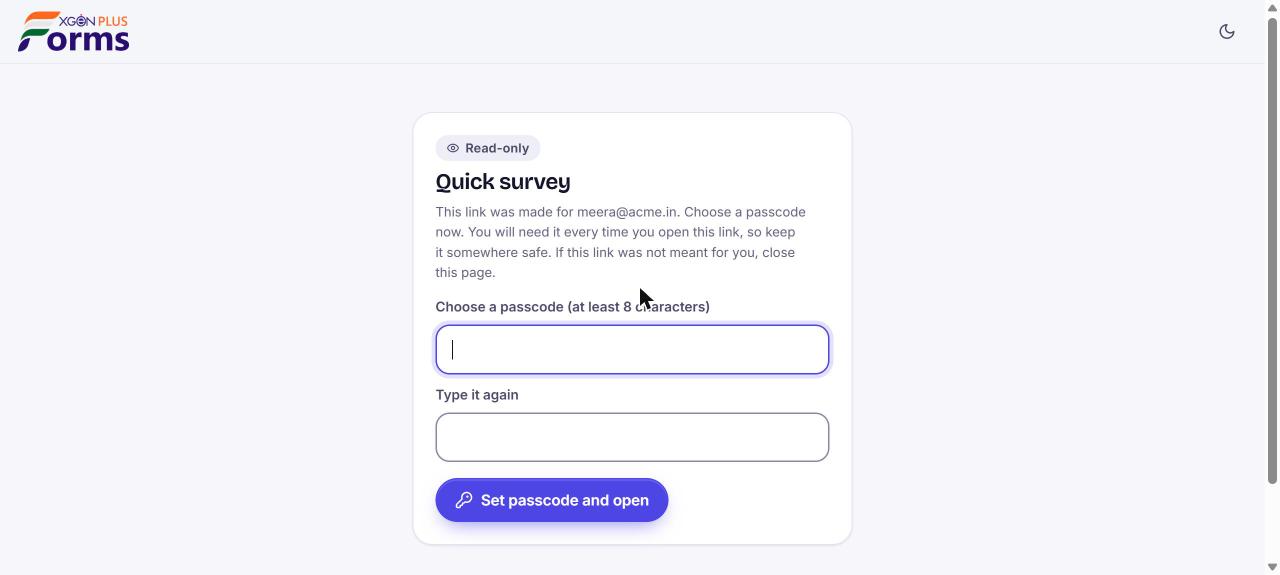
To let someone read your results, open the form in the builder, go to Settings, find Read-only viewers, type their email address and choose Add. The private link is copied for you. Send it to that person. They choose a passcode the first time they open it. Viewers see the Summary and the Responses table, never who answered.
How to share responses with read-only viewers
Where: forms.xgenplus.com › form builder › Settings › Read-only viewers
- Open the form in the builder and go to Settings.
- Find the card Read-only viewers.
- Type the person's email address and choose Add. The private link is copied for you.
- Send the link to that person, in chat, email or anywhere else. Send each link only to the person it is for.
- The person opens the link and, the first time, chooses a passcode of at least 8 characters and confirms it. After that they open the same link and type the passcode.
When to use it
Anita runs a customer survey and her manager wants to watch the results. She adds her manager as a viewer. The manager reads the charts and the table, and cannot edit, close or delete the form.
What a viewer sees
A viewer sees the Summary (charts and totals) and the Responses table. A banner says the view is read-only.
A viewer never sees who answered (respondent names and email addresses), uploaded files, or answers to email questions. This also holds for a question that used to be an email or file question before you changed its type.
A viewer cannot edit, close, publish or delete the form, change the viewer list, or open your other forms.
Manage your viewers
In Settings, each person in Read-only viewers shows Link not opened yet, or Passcode set with the date and when they last signed in.
| Action | What it does |
|---|---|
| Copy link | Copies the person's link again. |
| New link | The old link and passcode stop working at once and the person is signed out everywhere. They choose a new passcode on the new link. Use it if a link went to the wrong person or a passcode was forgotten. |
| Remove (the bin icon) | Access stops at once. |
Let viewers download the CSV
Downloading is off by default. To allow it, turn on Let viewers download the CSV in the same card. Viewers then see a Download CSV button. Their file has the same answers without the Respondent column.
Good to know
- Whoever opens a link first chooses its passcode, so share each link only with the person it is for.
- The email address you type is only a label. It is not checked, and nothing is emailed to the person.
- Sessions last 12 hours. After 5 wrong passcodes in a row, the person is locked out for 15 minutes.
- Opening the link does nothing by itself, so link previews in chat apps are harmless.
- The page is not indexed by search engines and does not pass the private address on to other sites.
- If the form is blocked, or your plan lapses, viewers see nothing until it is restored.
- Viewers have a private link, their own passcode and no respondent details. They are not meant as a way to share sensitive data.
Common questions
Do viewers need an XgenPlus account?
No. They only need the link and the passcode they choose.
Can a viewer see who answered?
No. Respondent names and email addresses are never shown to viewers.
Can viewers see files people uploaded?
No. Uploaded files and answers to email questions are hidden from viewers.
Can I share with a whole team?
Add each person on their own. Every person gets one link.
I sent the link to the wrong person. What do I do?
Choose New link next to that person. The old link and passcode stop working at once. Then send the new link to the right person, or choose Remove if they should not have access.
A viewer forgot the passcode. What do I do?
Choose New link next to them and send it again. They choose a new passcode on the new link.
How many viewers can a form have?
Up to 10 viewers per form on the free allowance and 25 with Forms Plus.
