

Manage people and licences in CRM
Open People in XgenPlus CRM to see everyone who can sign in, with their role and last sign-in. Change a role from the dropdown next to a name. When someone leaves, choose Switch off: their access ends at once and their deals and notes stay. Use Hand over to to give their open deals to a colleague.
How to manage people and licences in CRM
Where: crm.xgenplus.com › People › People
- Open People from the menu on the left.
- Stay on the People tab to see everyone, their role and their Last sign-in.
- To change a role, pick a new one from the role dropdown next to the person's name.
- When someone leaves, choose Switch off next to their name.
- If they have open deals, pick a colleague in Hand over to to give those deals to them.
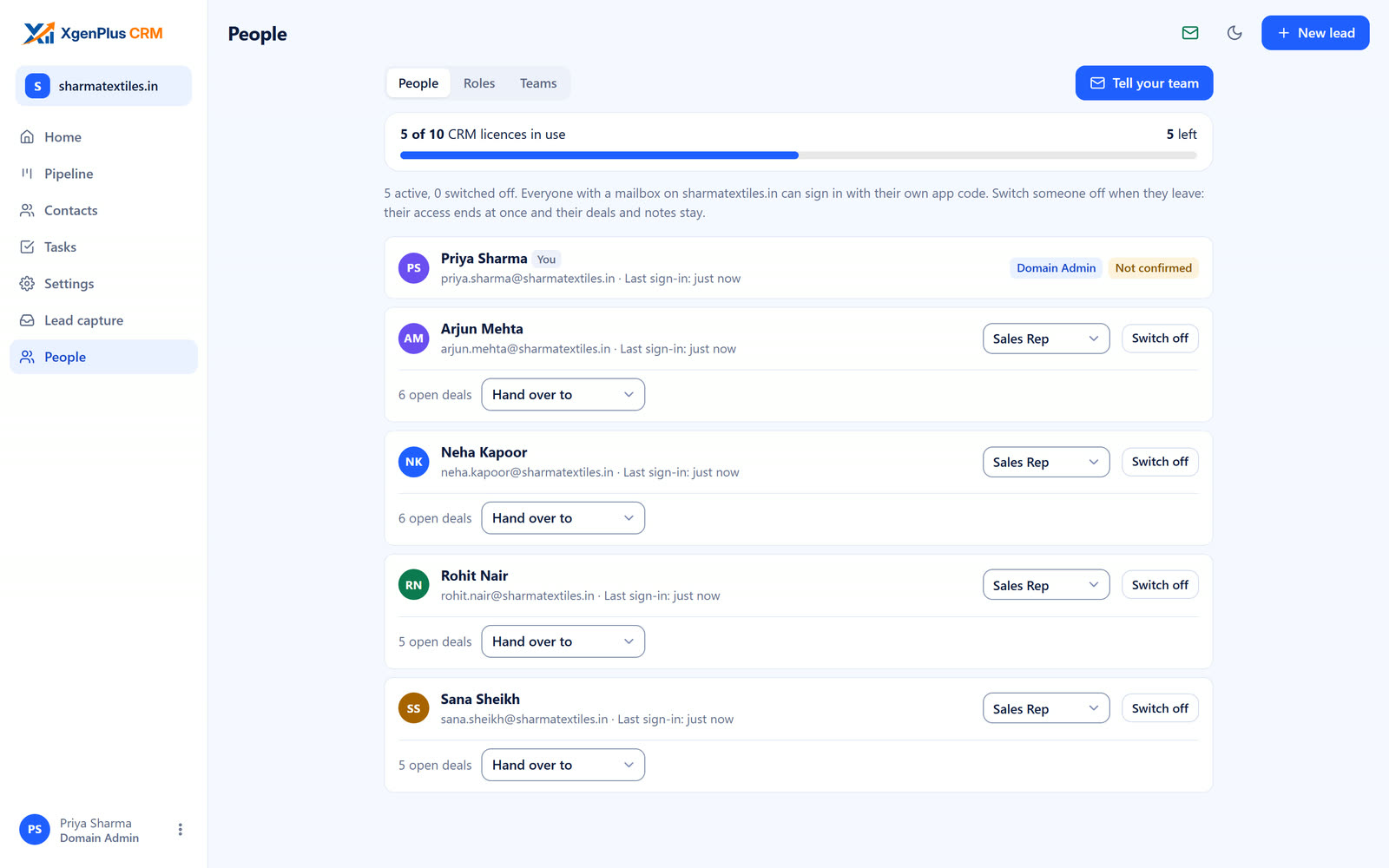
What you see on the People tab
The top of the page says how many people are active and how many are switched off. Each person has a card with their name, email address and Last sign-in. The Domain Admin is shown with a label, because that role comes from XgenPlus and cannot be changed here. Everyone else has a role dropdown (Sales Manager, Team Lead, Sales Rep, Field Agent or Viewer, plus any custom roles you have made).
Licences
The licence strip shows how many CRM licences are in use and how many are left, for example "5 of 10 CRM licences in use". It also appears at the top of Home. If no limit is set for your domain, it shows how many people use CRM and says that no licence limit is set.
Good to know
- What a person can do in People depends on their role. See the page on roles.
- Everyone with a mailbox on your domain can sign in with their own app code. Use Tell your team to email them how.
- Switch off ends access at once. Their deals and notes stay in the CRM.
- Hand over to appears when a person has open deals, for example "6 open deals".
Common questions
Who can sign in to CRM?
Everyone with a mailbox on your domain can sign in with their own app code. You choose their role in People.
What happens to a person's deals when I switch them off?
Their access ends at once, and their deals and notes stay. Use Hand over to to give their open deals to a colleague.
Does a lead use up a licence?
No. Only people who sign in to the CRM use a licence. Leads are customers, not users.
